





Benefits of Ergonomic Furniture for Long Work Hours
Table of Contents
- Why Long Work Hours Take a Toll on Your Body
- How Ergonomic Furniture Supports Spinal Alignment and Reduces Pain
- Ergonomic Chair Features for Back Pain: What to Look For
- How to Set Up an Ergonomic Home Office for Marathon Work Sessions
- The Productivity and Mental Focus Benefits of Ergonomic Comfort
- Choosing Luxury Office Furniture That Lasts
- Conclusion: Investing in Comfort for the Long Run
- Frequently Asked Questions
Last Updated: September 17, 2026
Why Long Work Hours Take a Toll on Your Body
Sitting for eight, nine, or ten hours a day is not a neutral activity. It is a sustained physical load, and the body keeps a record of it. The benefits of ergonomic furniture for long work hours start with understanding what that load actually does.
Ergonomic furniture is seating and desk equipment designed around human biomechanics so that the body holds a neutral body position rather than fighting gravity for hours at a time. The distinction matters because standard furniture is built to a fixed dimension, not to a person.
The consequences of ignoring this are well documented by occupational health bodies. Prolonged static sitting places sustained pressure on the lumbar spine, restricts blood circulation to the lower limbs, and encourages the forward head posture that strains the cervical spine. Over months, that pattern contributes to musculoskeletal disorders, repetitive strain injury, and chronic pain prevention becoming a much harder problem to solve.
This guide from Wish Interiors breaks down what actually changes when you invest in ergonomic design, which features matter, and how to set up a workspace that holds up over a full working day.
How Ergonomic Furniture Supports Spinal Alignment and Reduces Pain
The core mechanism is simple: ergonomic furniture removes the postural compromise that ordinary furniture forces on you.
A chair with proper lumbar support maintains the natural inward curve of the lower back. When that curve collapses, the discs between the vertebrae take uneven pressure, and the surrounding muscles work continuously to compensate. That is the physical strain most desk workers describe as a dull ache by mid-afternoon.
Adjustability is what makes this work across different bodies. Seat depth, seat height, backrest angle and armrest position all need to be settable, because a chair that fits one person perfectly can be actively harmful to another.
- Lumbar support keeps the lower spine in its natural curve rather than flattening it
- Seat depth should leave two to three fingers of space behind the knee
- Adjustable armrests take weight off the shoulders and reduce neck tension
- A tilt mechanism allows dynamic sitting, so the spine is not locked in one position all day
Dynamic sitting matters more than most people realise. Movement pumps fluid through the spinal discs, which have no direct blood supply of their own. A chair that lets you shift, rock and recline keeps that process going.
Ergonomic Chair Features for Back Pain: What to Look For
If back pain is already part of your working week, the feature list narrows considerably. Ergonomic chair features for back pain come down to four things: adjustable lumbar support, seat depth adjustment, a working tilt mechanism, and a headrest that supports the neck without pushing the head forward.
The Vinsetto Ergonomic Office Chair at Wish Interiors covers most of that ground at £67.44, with a dual-back design that provides flexible support and relieves pressure after long hours, plus adjustable height, rotatable armrests and a rocking function. The breathable mesh back matters more than it sounds: heat build-up is one of the reasons people shift position constantly, and a mesh back keeps you cooler through a long session.

For a step up, the HOMCOM Executive Office Chair at £69.99 adds a headrest that adjusts and rotates for neck support and lumbar support that moves forward, backward, up and down.
Vinsetto Ergonomic Office Chair, High →
How to Set Up an Ergonomic Home Office for Marathon Work Sessions
Getting the setup right takes about twenty minutes and it is the highest-return change most people can make. The goal is a neutral body position at every contact point: feet, seat, back, forearms and eyes.
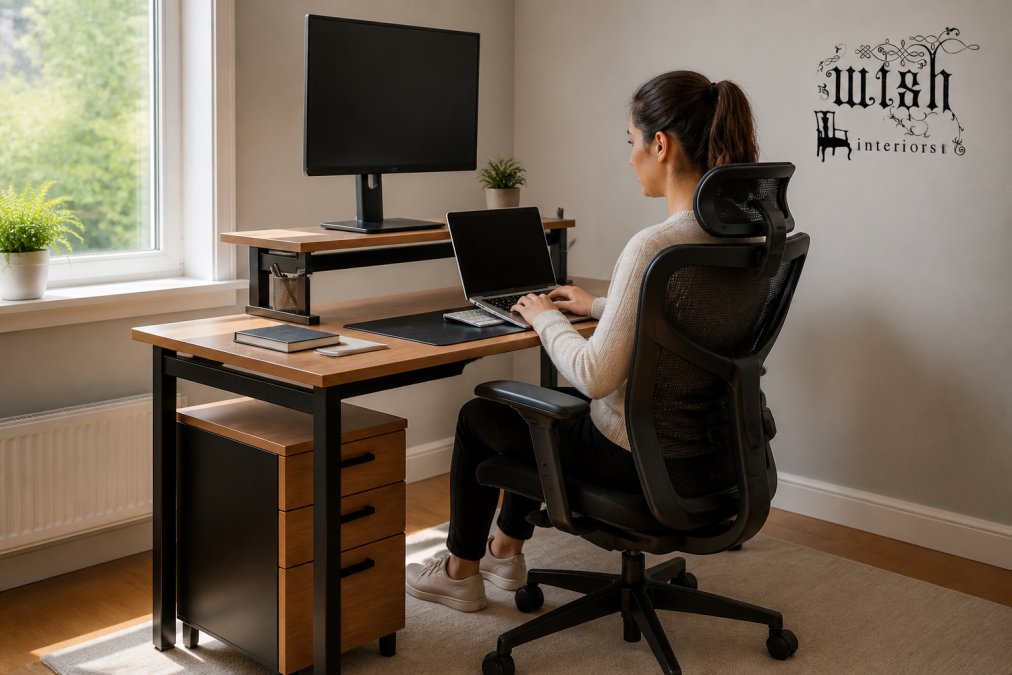
Work through it in this order:
- Chair height first. Feet flat, knees level with or slightly below hips. If your feet do not reach, use a footrest rather than lowering the chair.
- Seat depth. Slide back until your lower back meets the lumbar support with two to three fingers of clearance behind the knee.
- Lumbar position. Raise or lower the support until it sits in the small of your back, not your mid-back.
- Armrests. Set them so your shoulders relax downward and your elbows sit at roughly 90 degrees.
- Monitor height. Top of the screen at or just below eye level, an arm's length away.
- Keyboard and mouse. Close enough that your elbows stay by your sides, not stretched forward.
- Lighting. Position your screen perpendicular to windows to avoid glare, which drives the forward head posture that strains the cervical spine.
The Productivity and Mental Focus Benefits of Ergonomic Comfort
Physical discomfort competes directly with cognitive performance. When part of your attention is managing an aching back or a numb leg, that attention is not available for the work in front of you. This is the psychological impact of ergonomic comfort that most buying guides skip entirely, and it is where the real return on an ergonomic setup tends to show up.
- You notice the chair only when you stand up, and the ache arrives in the same place every afternoon
- You are re-reading the same paragraph because your attention keeps drifting to a pressure point
- You take more breaks than you need, not because you are tired but because sitting has become uncomfortable
- Your end-of-day mood is disproportionately flat relative to the work you actually did
Choosing Luxury Office Furniture That Lasts
Ergonomic equipment is only ergonomic while it still functions. A lumbar support that has lost its tension, a gas lift that sinks through the day, or a tilt mechanism that has seized all undo the benefit you paid for. Maintenance and longevity rarely get mentioned in ergonomic guides, but they are the difference between a purchase and a long-term investment in long-term health outcomes.
What actually degrades, and how to spot it:
- Gas lift. The most common failure. If the chair sinks under your weight over the course of a day, the cylinder is losing pressure. A replacement cylinder is inexpensive and usually a ten-minute job with basic tools.
- Lumbar tension. Foam and elastic supports compress over time. If the curve no longer meets your lower back without you pressing into it, the support has flattened.
- Tilt mechanism. Grit, dust and dried lubricant cause stiffness or a mechanism that no longer holds its position. A clean and re-grease often restores it.
- Castors and glides. Worn castors drag, which encourages you to twist rather than roll, a small postural compromise repeated hundreds of times a day.
- Mesh back. Mesh rarely fails structurally, but it can stretch or lose tension at the frame edges. Check the attachment points annually.
- Upholstery and foam. Foam that has lost its resilience no longer distributes pressure evenly, even if the chair still looks fine.
Conclusion: Investing in Comfort for the Long Run
The hardest part of ergonomic furniture is not choosing it. It is accepting that the discomfort you have normalised is not inevitable, and that a chair and desk setup can genuinely change how a ten-hour day feels.
Frequently Asked Questions
What are the primary health benefits of using ergonomic furniture during long work hours?
Ergonomic furniture helps maintain neutral body positions, reducing strain on the lumbar spine and cervical spine. This lowers the risk of musculoskeletal disorders and repetitive strain injury. Adjustable lumbar support and seat depth promote spinal alignment and improve blood circulation, which reduces fatigue and chronic pain. Over time, these features support long-term health outcomes and make it easier to stay comfortable through a full working day.
How does ergonomic furniture improve productivity during long work hours?
When your body is not fighting discomfort, your brain has more resources for focus. Ergonomic chairs with adjustable height, tilt mechanism and pressure relief keep you in a stable, supported position. This reduces fidgeting and the need for constant repositioning. The result is better concentration, fewer micro-breaks caused by aches, and more consistent output. Many users also report improved cognitive performance because physical strain no longer distracts them.
What is the 30/30 rule in ergonomics and how does it apply to office work?
The 30/30 rule suggests that for every 30 minutes of sitting, you should take a 30-second break to stand, stretch or walk. It helps counteract the effects of a sedentary lifestyle by restoring blood circulation and relieving pressure on the spine. During long work hours, set a timer or use an app to remind you. Pair this with an adjustable height desk or a chair that supports dynamic sitting to make transitions easier.
What features should I look for in an ergonomic chair for all-day comfort?
Prioritise adjustable lumbar support, seat depth and height, plus a tilt mechanism that lets you rock or lock positions. Rotatable or flip-up armrests free up space and reduce shoulder tension. A breathable mesh back keeps you cool, while thick foam padding cushions pressure points. For back pain, look for chairs with a dual-back design or adjustable headrest. Always check the weight capacity and dimensions to ensure a proper fit for your body and workspace.
Sample Image Gallery


